
Download JoyPlanet – AI‑Powered Personalized Book Creator
Overview
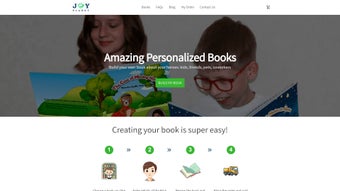
JoyPlanet is a web‑based AI writing assistant that specializes in generating fully personalized books for both children and adults. The platform lets users insert a wealth of personal details – from the main character’s name, age, and hobbies to custom photos that are transformed into cartoon‑style illustrations. Within seconds, JoyPlanet assembles a story that feels tailor‑made for birthdays, holidays, anniversaries, or any special occasion.
The interface is deliberately simple: a clean, drag‑and‑drop layout guides you through each step, while an optional dedication letter adds a heartfelt, handwritten‑style note to the final pages. Although the core experience runs entirely in the browser, JoyPlanet relies on JavaScript to unlock its full suite of features, meaning that users with disabled scripts will see a stripped‑down version. The service operates on a subscription model but offers a free trial that lets you test the creation flow before committing.
By merging AI‑driven narrative generation with personal photo integration, JoyPlanet fills a niche for families, educators, and marketers who want a fast, secure, and highly customized storytelling tool without the need for design expertise.
Key Features & Customization Options
- AI‑Generated Storylines: Input basic character data and let JoyPlanet’s language model craft a coherent, age‑appropriate narrative in under a minute.
- Photo‑to‑Cartoon Converter: Upload personal photos; the platform automatically renders them as whimsical illustrations that appear throughout the book.
- Multiple Themes & Genres: Choose from pre‑set templates such as adventure, fairy‑tale, mystery, or educational formats to match the occasion.
- Dedicated Letter Section: Add a personalized dedication that is printed on the title page in a custom font.
- One‑Click Export: Download the finished book as a high‑resolution PDF or order a printed hard‑cover version directly from the site.
- Multi‑Language Support: Create stories in English, Spanish, French, and German, expanding its reach to international families.
- Secure Cloud Storage: All projects are saved securely in an encrypted cloud vault, allowing you to revisit and edit them later.
- Collaboration Mode: Invite family members or teachers to contribute ideas or approve content before finalizing.
While JoyPlanet offers an impressive range of customization, it does lean on a set of preset themes, which can limit absolute creative freedom. Nevertheless, the AI’s ability to blend personal details with narrative structure ensures each book feels genuinely unique. The platform also integrates a simple feedback loop: after generating a draft, users can tweak character traits or request alternative plot twists, and the AI will regenerate the story instantly. This iterative process keeps the experience interactive and reduces the need for external editing tools.
Installation, Usage & Compatibility
Getting Started – No Download Required
JoyPlanet is entirely browser‑based, which means there is no traditional software installation. To begin, visit joyplanet.com and click the “Create Your Book” button. Because the service runs on modern JavaScript frameworks, make sure your browser’s JavaScript is enabled; otherwise, you’ll only see a limited static interface. The platform supports all major browsers, including Chrome, Firefox, Edge, and Safari, on both desktop and mobile devices.
Step‑by‑Step Workflow
- Sign‑Up or Log In: Create a free account using an email address or connect via Google or Apple ID.
- Enter Character Details: Fill in fields for name, age, favorite activities, and any special traits.
- Upload Photos: Drag and drop images; the AI instantly converts them into cartoon illustrations.
- Select a Theme: Pick a preset genre that matches the intended tone of the book.
- Generate the Story: Click “Create” and watch the AI compose the narrative within seconds.
- Review & Edit: Use the on‑screen editor to adjust wording, swap illustrations, or modify the dedication.
- Export: Download the PDF or order a printed copy; the platform also offers direct sharing links.
Operating System Compatibility
JoyPlanet works on Windows 10/11, macOS Ventura and later, Chrome OS, as well as Android 9+ and iOS 13+ devices via web browsers. Because the application is cloud‑based, performance is largely dependent on internet speed rather than local hardware specifications.
Security & Updates
The service employs HTTPS encryption for all data transmission, and user‑uploaded photos are stored in an ISO‑27001‑certified data center. JoyPlanet receives regular backend updates that improve AI accuracy, add new themes, and patch security vulnerabilities—all applied automatically without user intervention.
Pros, Cons & Frequently Asked Questions
Pros
- Fast, AI‑driven story generation (seconds per book).
- Highly personalized with custom photos and dedication letters.
- No installation—access from any device with a modern browser.
- Secure cloud storage and encrypted data handling.
- Multi‑language support expands global usability.
Cons
- Full feature set requires JavaScript; limited functionality without it.
- Customization is bounded by preset themes, reducing absolute creative freedom.
- Subscription pricing may be a barrier for occasional users.
- Illustration style is cartoon‑centric, which may not suit all audiences.
- Internet connection is mandatory; offline use is not supported.
Frequently Asked Questions
Can I use JoyPlanet on a mobile device?
Yes. JoyPlanet is fully responsive and works on Android and iOS browsers. Just open the site, enable JavaScript, and follow the same creation steps as on a desktop.
Is there a free version?
JoyPlanet offers a 7‑day free trial that lets you generate up to three books with all premium features. After the trial, a monthly or annual subscription is required to continue using the full toolset.
How secure are my uploaded photos?
All uploads are transmitted over HTTPS and stored in encrypted cloud storage. JoyPlanet complies with GDPR and CCPA regulations, ensuring your personal data remains private.
Can I edit a book after it’s generated?
Absolutely. JoyPlanet’s editor lets you modify text, swap illustrations, and change the dedication letter before you export or print the final version.
What payment methods are accepted?
The platform accepts major credit cards (Visa, MasterCard, American Express), PayPal, and Apple Pay for subscription purchases.
JoyPlanet delivers a delightful blend of AI storytelling and personal photo illustration, making it an excellent choice for families and educators seeking quick, customized books. The only downside is the reliance on preset themes, which may feel limiting for advanced users.
Conclusion & Call to Action
In a market flooded with generic e‑book generators, JoyPlanet stands out by putting the user’s personal story at the center of the creative process. Its AI engine reduces the time required to craft a meaningful narrative from hours to seconds, while the photo‑to‑cartoon feature adds a visual charm that resonates with both children and adults. For anyone looking to celebrate a birthday, holiday, or milestone with a one‑of‑a‑kind book, JoyPlanet offers a secure, cross‑platform solution that balances ease of use with meaningful customization.
Ready to turn your family photos into a magical adventure? Start your free trial today and experience the joy of personalized storytelling in just a few clicks.



.png)



